
You can view all users associated with your company account in the "Users" section, accessible from the side menu of your user area.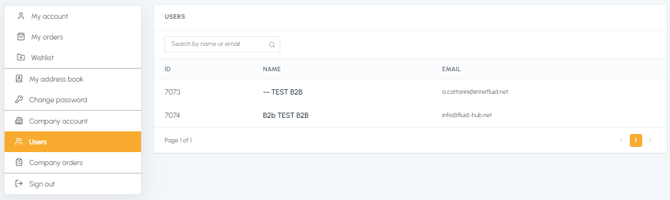
On this page you will find a table with the complete list of users, with the following information:
- ID: unique system identifier (internal use)
- Name: first name and last name of the user
- Email: email address associated with the account
You can search and filter the users using the search field at the top by name or email address. If there are many users, the list is paginated and you can navigate between the different pages at the bottom of the table.
Note:
-
The "Users" section is a view-only window: you cannot add, modify or remove users directly from here.
-
If you don't see the "Users" section in the menu, it means that your company account is not active yet: at the moment you are the only user of your company registered on fluid-hub.
To understand in detail how multi-user management works, read What is the company account on fluid-hub?