
If you've forgotten the password for your fluid-hub account, you can reset it in just a few steps: click on "Forgot password?" on the login screen, enter the email address associated with your account, and follow the link you receive by email to create a new password.
Complete procedure:
- Click on "Log in or register" on the homepage
- Select the "Forgot password?" link on the login screen
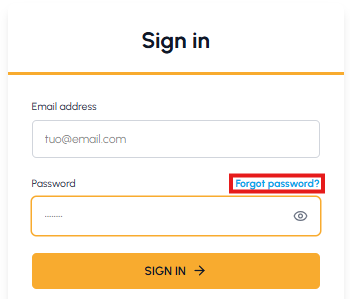
- Enter the email address associated with your account
- You will receive an email with a link to reset your password
- Click on the link and create a new password meeting the required criteria, then confirm and save it
- Once you have set the new password, you can access it immediately: read How can I access my fluid-hub account?
Password requirements: your password must contain:
- At least 8 characters
- At least one lowercase letter
- At least one uppercase letter
- At least one number
Alternative: If you have linked your Google or Microsoft account, you can log in directly using one of these profiles without needing a password.
If you do not receive the recovery email, check your spam folder or contact us at info@fluid-hub.com.
If, however, you remember your current password and simply want to change it, read Where can I change my account password?