
To register on fluid-hub, you need to fill in the registration form with your company's data and your personal data. Once submitted, our team validates the request within 24 hours and sends you an email with the link to set the password and activate the account.
Where to start the registration:
- "Login or register" in the site header (top right, visible on any page)
- "Become a customer" on the homepage, in the footer or in the navigation menu.
You will be redirected to the registration form where you will need to enter:
- Your company details (company name, VAT number, tax code, registered office, billing details, etc.).
- Your personal details required to access fluid-hub (first name, last name, email, phone number, etc.).
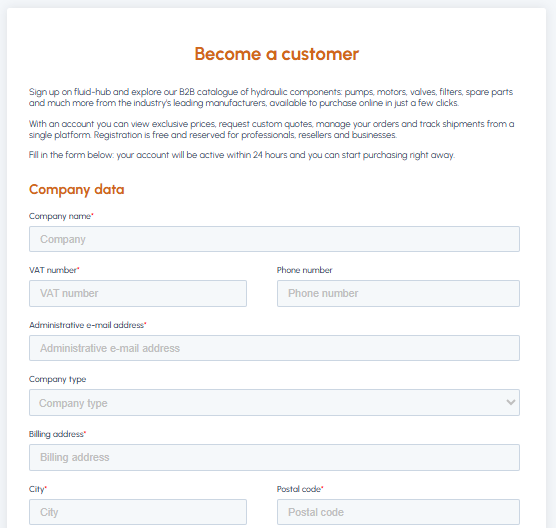
For the complete list of required fields, read What information is needed to register on fluid-hub?
After completing and submitting the form:
- The fluid-hub team will review your request and proceed with entering your data on the platform.
- Once the request has been validated, you will receive a confirmation email containing a link to set your password.
- After setting your password, your account will be active and you will be able to access all the features of the site.
This process generally takes place within 24 hours of completing the registration form. To avoid delays in activating your account, we also recommend reading What happens if I enter incorrect or incomplete data?
Note: If you prefer, once your account is active, you can log in using your Google or Microsoft profile directly. If you want to find out more, read Is it possible to register via Google, Microsoft or Apple?
If, however, you are interested in a multi-user company account, you can read What is the company account on fluid-hub?