
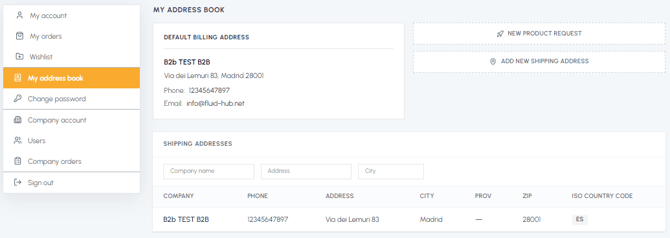
The "My address book" section allows you to consult all the addresses associated with your fluid-hub account: the default billing address of your company and additional shipping addresses (branches, warehouses, construction sites, end customers).
What you can do from the "My address book" section:
- View the default billing address of your company (company name, registered office address, phone, administrative email)
- Consult all the shipping addresses you have saved. To understand the distinction between the different types of addresses, read What is the difference between the default billing address and the shipping addresses?
- Add new shipping addresses to speed up the checkout of future orders
- Search and filter saved addresses by company name, address or city
The addresses saved in the address book can be used quickly during purchase, without having to re-enter the data manually each time. This is particularly useful if:
- Your company has multiple operational sites or branches
- You frequently ship to different warehouses or sites
- You make direct deliveries to the end customer
To update or remove an existing address, read Can I modify the shipping addresses or the default billing address?