
On fluid-hub you can request a return in two ways: from the "My orders" section of your account, by clicking on the "Request return" icon, or directly from the return request form accessible from the site footer.
Method 1 - From the "My orders" section:
- Access the "My orders" section in your account
- Locate the order containing the products you want to return
- Click on the "Request return" icon in the "Actions" column
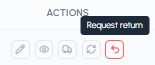
- You will be redirected to the return request form
Method 2 - Directly from the return request form:
You can also access the return request form directly from the site footer, without going through the "My orders" section. This method is faster if you already have the order number and delivery date on hand.
In the form you will need to provide:
- Order details (order number and delivery date of the parcel)
- Your contact details (company, phone, email)
- Reason for the return (description of the problem and products to be returned)
- Supporting documentation (optional but recommended)
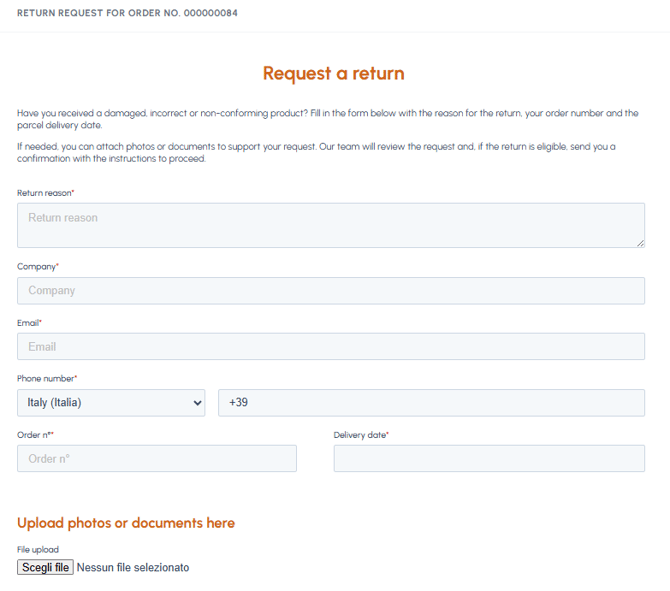
For the complete list of fields and how to fill them in, read What information do I have to provide for the return?
After submission, you will receive a confirmation by email. The fluid-hub team will evaluate the request and will contact you as soon as possible with the outcome and the instructions for returning the goods.
Note: You can only request a return for orders placed with your account. If you have a company account but the order was placed by a colleague, they will need to submit the request from their own account.
To understand how the case develops after submission, read What happens after submitting the return request? To find out which products are excluded from the return, read Are there products excluded from the return?