
You can view the company orders by accessing the "Company orders" section from the side menu of your user area.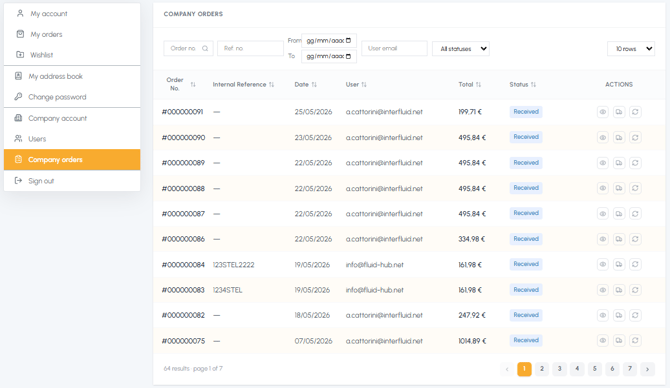
On this page you will find a table with the list of all orders placed by any user of your corporate account, with the following information:
- Order No.: identification number of the order
- Internal Reference No.: the customer order number entered during checkout (if present - to learn more read What is the internal reference number?)
- Date: date the order was placed
- User: email of the user who placed the order
- Total: total amount of the order
- Status: current status of the order (e.g. Delivered, In delivery, Processing)

- View the complete details
- View the tracking of the order to monitor the shipment
- Buy the same products again
Unlike the "My orders" section, the modify order and return request functions are not available here. These actions are reserved exclusively for the user who placed the order, who can manage them from their own "My orders" section. To discover all the differences between personal and company orders, read What is the difference between "My orders" and "Company orders"?
The list is paginated if there are many orders, and you can navigate between the different pages at the bottom of the table.
Note: The "Company orders" section is visible only if your company account is active (i.e. if there are multiple users associated with your company). If you are the only user, this section will not be present in the menu.