
You can view all your personal orders in the "My orders" section, accessible from the side menu of your user area. Here you will find the complete list of orders placed with your account, with the main identification details, the current status and the quick actions to manage them.
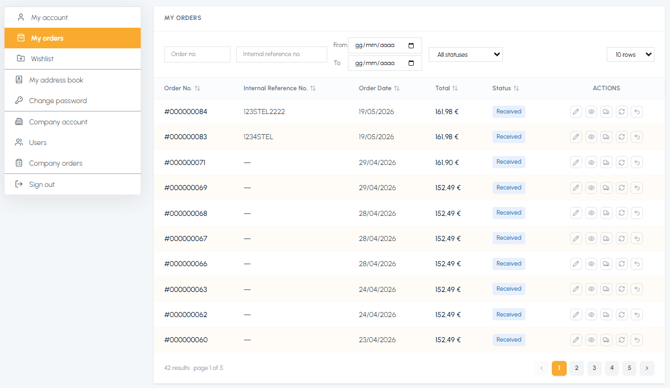
Information available for each order:
- Order number (e.g. #000000071)
- Internal reference number, if entered during checkout (for more information, read What is the internal reference number?)
- Order date
- Order total
- Current status (e.g. Received, Processing, Shipped, Delivered)
- Tracking to monitor the shipment
For each order, several quick actions are available through the buttons in the "Actions" column:
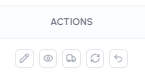
- Modify the order (only if not yet processed)
- View the full details
- View the shipment tracking
- Buy the same products again
- Request a return
Note: If yours is a multi-user company account, in the "My orders" section you will only view the orders placed by you. To see all your company's orders (including those placed by other colleagues), access the "Company orders" section. For more information, read Where can I view company orders?
To quickly find a specific order, read How does the order search work? To consult all the details of a single order, read How can I view the details of an order?